The product readiness layer
Make every product ready to sell.
Connect the feed you already have and SKULayer will find what is holding your products back, show you every fix before it goes live, and deliver cleaner data to Google and Meta. Manage it in the app or through your own AI.
Free for up to 1,000 products. No card. Paid plans from £29 a month.
The audit reads like advice, not a log file
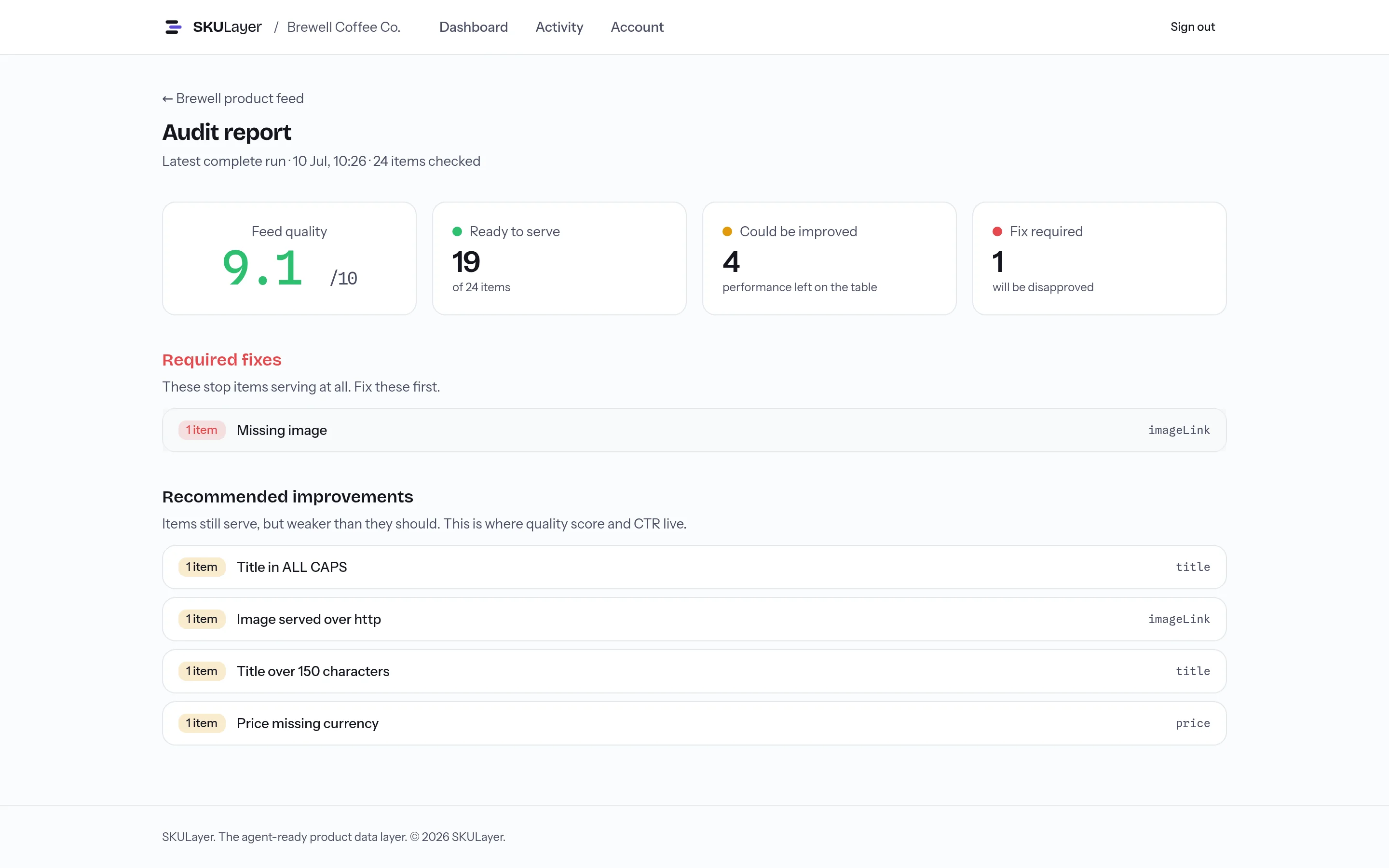
Connect a feed and every item is checked against the disapproval triggers and quality drags that cost impressions. Findings in plain English, the products affected beside each one, and a route to the fix. The score follows a published methodology, so it means the same thing in your report as it does in ours.
- Preview-first: nothing changes silently
- Your first 1,000 products free, no card, no expiry
- Flat published pricing, no sales call
- Your first audit in about ten minutes
- Cancel in two clicks, keep your data
See what's holding products back
A plain-English audit of missing data, disapproval risks, and quality gaps, with the products affected and a practical next step beside every finding.
Fix it without becoming a feed specialist
Click a recommended fix, describe a rule in a sentence, edit a single product by hand, or ask your AI. Every fix becomes an ordinary rule you can inspect, edit, or remove.
Keep a safe feed live
Every change is previewed against real products before you save, and your live feed only changes when a new version passes every check.
Feed optimisation in four steps
Connect the feed once. The four steps run on repeat, on your schedule, for every channel you serve.
- 1 · Connect
Point SKULayer at your existing feed. CSV, TSV, JSON, or XML from any platform.
- 2 · Audit
Every item checked against the Merchant Center disapproval triggers and quality drags that cost you impressions.
- 3 · Transform
Your rules run in order, the same way every time. Preview the impact before anything ships.
- 4 · Serve
Google XML and Meta CSV, at a stable URL you point Merchant Center and Meta at once and never touch again.
Catalogues of any size, on any schedule you like, without you watching it.
See the impact before anything ships
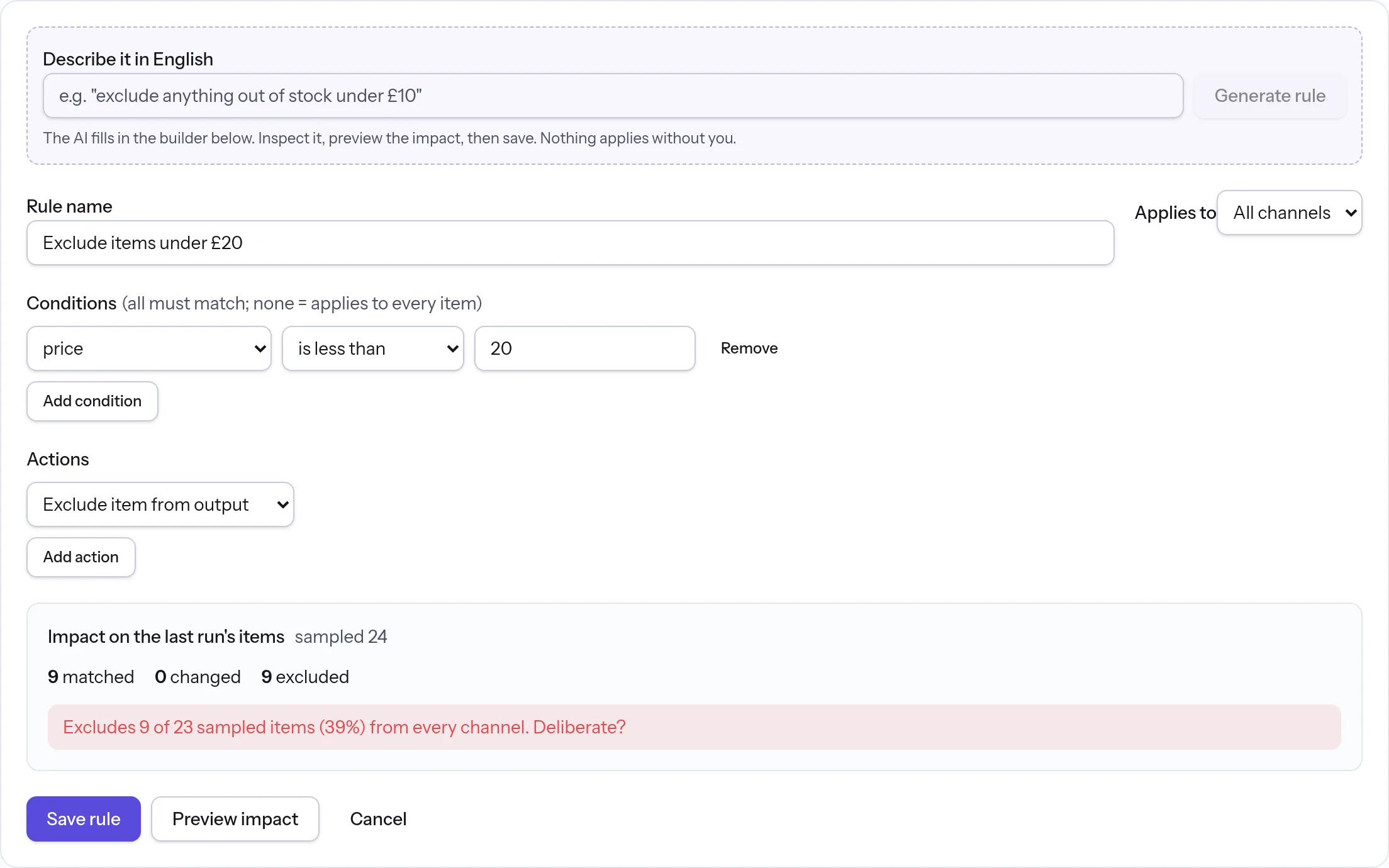
Every rule is previewed against your real items first: how many match, what changes, what gets excluded. If a rule would empty a required field or drop a third of your catalogue, SKULayer tells you before you save, not after Google does.
Describe the fix. SKULayer does the tedious part.
Feed problems are easy to describe and slow to fix by hand. Say what you want changed, four ways, and see the exact impact before anything ships.
Type it
"Append size and colour to every variant title" becomes a drafted rule, unsaved, with a preview of every item it touches. You save it, or you don't.
Click it
One-click packs fill missing brands, colours, and product types, and clean up availability wording. The fix lands as ordinary rules you can open, edit, or remove.
Edit it by hand
Open any product, see the source and delivered value of every field side by side, and fix the odd one out directly. Manual edits survive every feed refresh.
Or ask your AI
Your AI assistant reads the audit, drafts the fix, shows you the preview, and runs the feed while you watch from your phone. See how it works
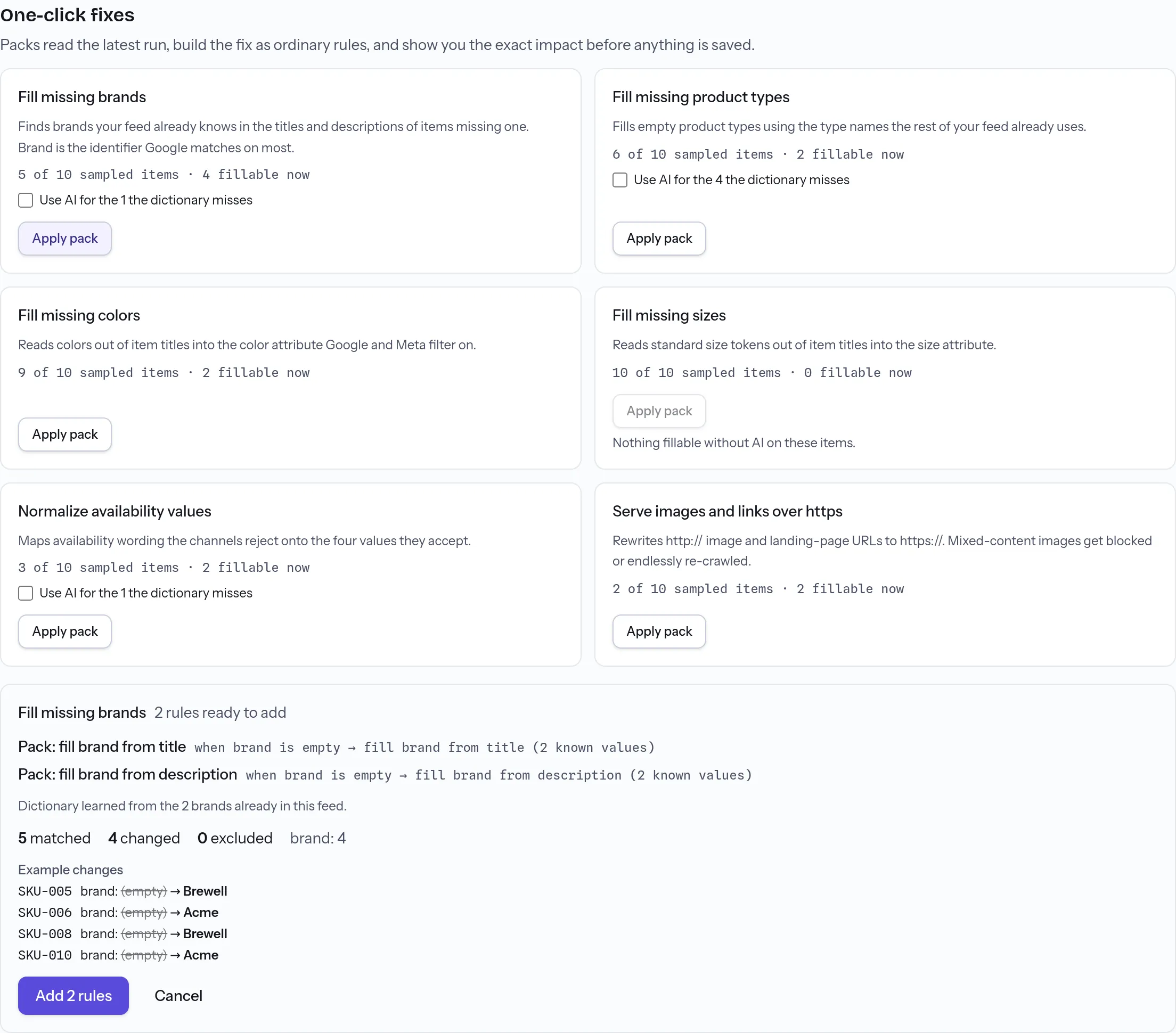
Every path is preview-first. Nothing changes your feed silently, whoever, or whatever, asked for the change.
Your product feed, inside the AI you already use
Ask what's wrong with a feed, read Google's own verdicts, draft a fix, see the preview, and run the feed, all from the same conversation. Access starts read-only. Write access is explicit, every proposed change comes back as an impact report before it applies, and you can revoke access at any time.
Your AI asks. SKULayer checks. You approve.
Powered by a secure MCP connection with scoped, revocable access.
For agencies
Run every client feed from one place.
Audit and improve Google Shopping and Meta feeds across your whole client book, with client separation and one pooled SKU allowance. Readable rules your team can pick up, and urgent feed work handled from the AI assistant already on your phone.
SKULayer for agencies →For retailers
Fix your product feed without hiring a specialist.
Connect the feed your store already produces. SKULayer shows what's limiting your products, turns repeated problems into rules, and serves a cleaner version to Google Shopping and Meta on your schedule.
SKULayer for retailers →One glance tells you the state of every feed
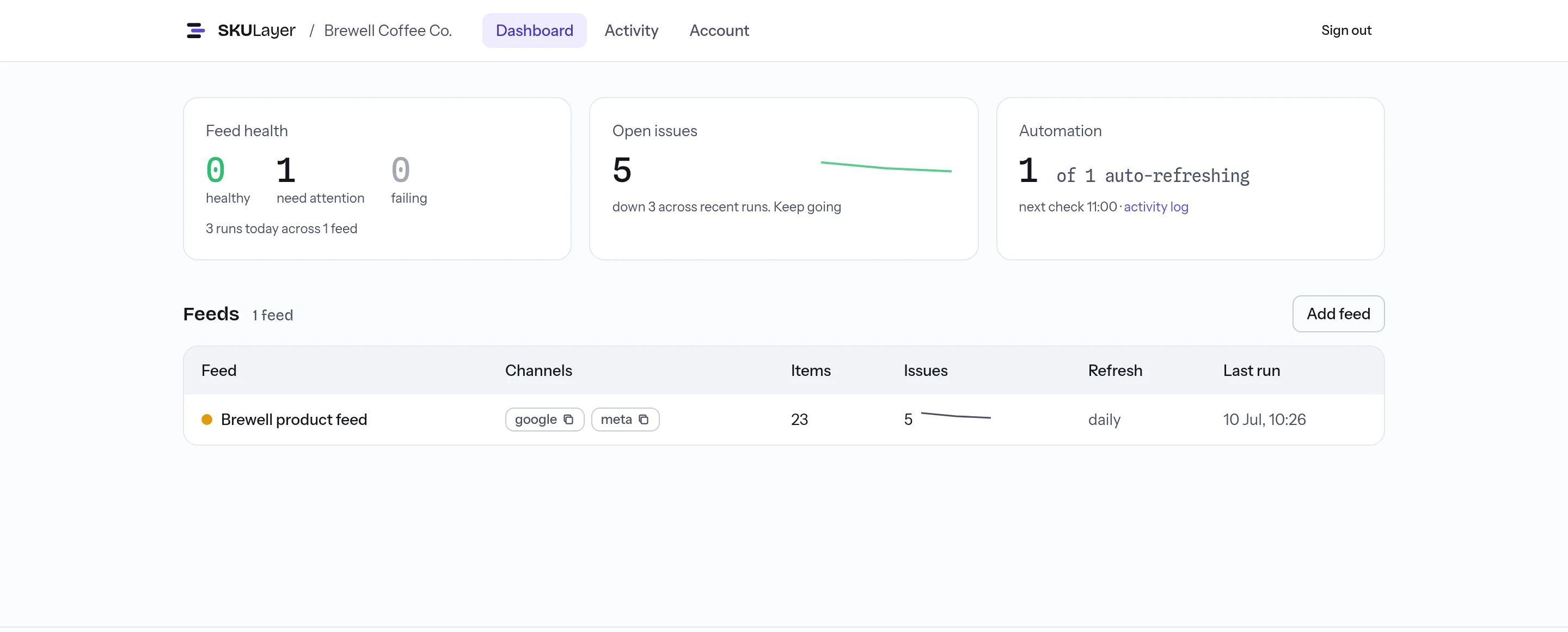
Health, open issues, and the next scheduled run for every feed and every client, on one screen. When the issue trend points down, you're winning.
Questions, answered
What is product feed optimisation?
Your product feed is the file that tells Google Shopping and Meta what you sell. Optimisation is the work of getting that file right: filling missing identifiers, shortening titles that truncate, correcting availability and price, mapping products to the right categories. Get it wrong and items are disapproved outright or quietly lose impressions. SKULayer audits the feed you already have, shows you what each fix would change before it ships, and serves a cleaner version to Google Shopping and Meta.
Is SKULayer a feed management tool?
Yes, and it does the jobs you would expect from one: connect a source feed, transform it with rules, deliver a channel-ready output to Google Shopping and Meta. The difference is the model. One ordered rule stack shapes a single clean catalogue rather than per-field mappings duplicated per channel, every rule is previewed against your real items before it applies, and you can operate the whole loop from the app or through your own AI assistant.
How is SKULayer different from DataFeedWatch, Feedonomics, and Channable?
They are established products with a different operating model. Their workflows are organised around per-field, per-channel mappings, and several price by conversation: as of July 2026, DataFeedWatch lists tiers without figures, Feedonomics quotes on request, and Channable prices by module and volume. SKULayer keeps one ordered, readable rule stack that shapes a single clean catalogue, previews every change against your real items before it applies, publishes flat pricing on this site, and documents a way for your own AI assistant to operate the whole loop, with previews returned before any write. We found no publicly documented equivalent of that last part in those tools when we checked in July 2026.
Can I edit a single product by hand?
Yes. Search your catalogue, open any product, and you will see every field twice: as your source feed sends it, and as SKULayer delivers it. Click a field, type the better value, and the edit is saved as a manual edit that wins over your other rules and survives every future feed refresh. Manual edits live in an ordinary rule you can open, inspect, and remove, so hand fixes are never invisible spreadsheet surgery.
What feed formats and platforms does SKULayer support?
CSV, TSV, JSON, and XML (including Google Shopping RSS and Atom) over a URL. If your platform can produce a feed URL, whether that is Shopify, WooCommerce, Magento, BigCommerce, or the export from a tool you already use, SKULayer can read it. Connect the URL once and we fetch it on your schedule.
Which channels can SKULayer serve?
Google Shopping (XML) and Meta (CSV) today, compiled from one clean catalogue, each with optional channel-specific rules on top. The same layer is built to serve the channels that come next, including AI shopping surfaces reading structured product data.
Do AI-drafted rules change my feed automatically?
Never. Describe the rule you want and SKULayer drafts it, but it lands in the builder unsaved. You see how many items match, what changes, and what it would do to your audit before you save. Risky rules, like one that empties a required field, demand an explicit second confirmation.
What counts toward my SKU limit?
Items processed across your workspace, pooled over all feeds and clients rather than counted per feed. A 12,000-item catalogue uses 12,000 of a 25,000 limit whether it flows through one feed or five. Pro and Agency plans can add +25,000-SKU packs from £25 per month whenever they need headroom, and pack pricing steps down at volume.
Who owns the product data I connect?
You do. Feed data is processed on your behalf to run audits, transformations, and delivery. It is not sold and not used to train AI models. Working files from earlier runs are tidied up automatically, and deleting your account removes your data.
Is the Free plan really free forever?
Yes. Your first 1,000 products are on us: one feed, audited and fixed daily with rules and one-click fixes, and served live to Google Shopping and Meta from your own delivery URL. You also get 3 manual runs a day, 50 AI assists a month, a weekly digest email, and read-only agent access. No card, no expiry. Paid plans add scale and speed, not capability: more products, more feeds and stores, hourly refresh, and the Merchant Center connection, from £29 a month.
What happens at the end of the free trial on paid plans?
Trials run 14 days with full features. Card details are taken when you pick a plan at checkout, and nothing is charged until the trial ends. Cancel from the billing portal in two clicks before then and you pay nothing. The Free plan is separate and is not a trial: it does not expire.
Coming from another tool? Read the Shoptimised comparison or the DataFeedWatch comparison, or start with what feed optimisation involves.
See what your feed needs next
Connect the feed you already have and SKULayer audits, fixes, and serves it daily from then on, free for your first 1,000 products. If it's healthy, SKULayer will tell you. If it's not, every finding comes with the products affected and a route to the fix.
Start free